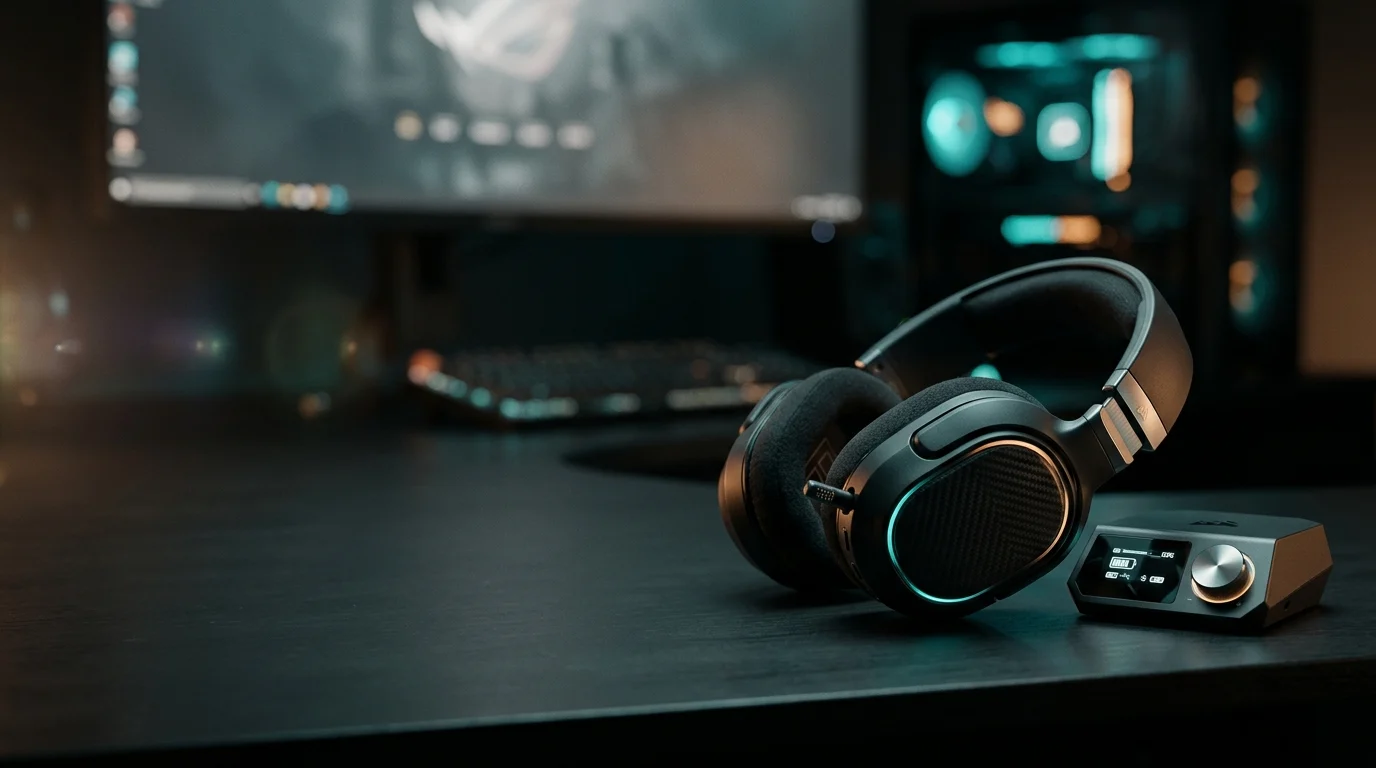
It’s SteelSeries’ top-end wireless headset. It comes with a desktop base station and works with several devices at once. Here’s what makes it different from cheaper headsets.
Design and Comfort
The headband follows the “ski goggles” style that SteelSeries uses across its Arctis range. A suspended band holds the headset snugly. The band rests on your head instead of the earcups clamping down, so pressure spreads out.
There is one comfort complaint. The leatherette earcups can feel warm during long sessions. If you sweat easily or play in a warm room, that matters.
The Base Station and Swappable Batteries
The headset connects through a base station called the GameDAC. A DAC (digital-to-analog converter) turns digital audio into the sound you hear. This one also acts as the wireless receiver and a control point for several audio settings.
The headline feature is the battery system. You get two batteries and can swap them on the fly, and the base station has a slot to charge the spare. Battery life figures vary between retailers, so check SteelSeries’ official site for the current rating.
Which Version Should You Buy?
Three versions matter, and the wrong choice is easy to make.
- Standard and PlayStation versions: If you don’t own and don’t plan to buy an Xbox, either one is fine.
- Xbox version: Look for the Arctis Nova Pro Wireless X. The standard model needs this variant to work with Xbox.
- Colors: SteelSeries has since added a white version.
Platform support and SKUs (product versions) change, so confirm the exact model name before buying.
Setup Guide by Platform
Setup is mostly plugging in the base station, then pairing the headset. The steps differ a little by device. Treat this as a general walkthrough, and check SteelSeries’ official manual for exact menu names, since they change with system updates.
PC Setup
Connect the base station to your PC with a USB cable. The back of the receiver has line in, line out and dual USB-C connectors.
Next, install SteelSeries GG, the company’s free companion app. It is where you change audio settings and open Sonar, a tool for building custom sound profiles. One reviewer, who isn’t a fan of GG overall, says Sonar makes the app much better.
PlayStation Setup
For PS5, choose the PlayStation version or the standard one, which listings describe as supporting PS5, PC and Switch. Plug the base station into a USB port on the console, then set the console’s audio output to the USB device. The exact menu path is in the PS5 settings, so check Sony’s or SteelSeries’ guide.
Xbox Setup
Xbox needs the Arctis Nova Pro Wireless X. The standard model doesn’t work natively with Xbox. Some retail pages blur this, so confirm the model name before you buy. Once you have the right one, connection follows the same plug-in-and-select-audio pattern.
Switch, Mobile and Bluetooth
The headset adds Bluetooth alongside its main wireless link. This was new for the Nova Pro series. That lets you pair a phone while keeping your game connection.
Platform Feature Differences
This is where the headset’s honest limits show.
- Sonar is PC-only. Shacknews lists this as a drawback. On console you get fewer sound controls.
- Learning curve. Tom’s Guide calls it impressive but says it has a big learning curve. Expect to spend time in the settings.
Beginner Tips for Getting the Most Out of It
The default sound is a starting point, not the finish line. These four habits help most, and none need technical skills.
Start With a Preset EQ, Then Tweak
EQ (equalizer) controls how much bass, mids and treble you hear. Don’t build a custom curve on day one. Pick a preset in the software, play a game you know well, and change one thing at a time.
Choose one place to adjust EQ and stick with it. SoundGuys hopes Sonar will one day work smoothly with the base station’s own EQ, which suggests the two don’t always mesh well today. Stacking settings in both places can muddy the sound.
Dial In Spatial Audio, and Know When to Turn It Off
Spatial audio makes sound seem to come from around you, which helps you judge where footsteps or gunfire are coming from. BGR’s reviewer liked being able to adjust how strong the effect is.
Start at a low-to-medium level. Too much can make music and dialogue sound hollow, so switch it off for movies, music, or slower story games if it feels odd.
Set Up ANC and Transparency Mode
ANC (active noise cancellation) uses microphones to reduce background sound, like a fan or traffic. Transparency mode does the opposite and pipes outside sound in so you can hear someone talking to you.
Transparency has a flaw. Shacknews notes it doesn’t scale with audio volume, so you may need to adjust it manually. Don’t expect ANC to match dedicated travel headphones.
Pair Bluetooth and Wireless Together
The headset can stay connected to your game and a second device at once. The manufacturer’s description mentions Dual Wireless technology. Pair your phone over Bluetooth to hear calls while you play. The exact pairing steps are in SteelSeries’ manual, so check the official site.
Setup Guide by Platform
Setup is mostly plugging in the base station, then pairing the headset. The steps differ a little by device. Treat this as a general walkthrough, and check SteelSeries’ official manual for exact menu names, since they change with system updates.
PC Setup
Connect the base station to your PC with a USB cable. The back of the receiver has line in, line out and dual USB-C connectors.
Next, install SteelSeries GG, the company’s free companion app. It is where you change audio settings and open Sonar, a tool for building custom sound profiles. One reviewer, who isn’t a fan of GG overall, says Sonar makes the app much better.
PlayStation Setup
For PS5, choose the PlayStation version or the standard one, which listings describe as supporting PS5, PC and Switch. Plug the base station into a USB port on the console, then set the console’s audio output to the USB device. The exact menu path is in the PS5 settings, so check Sony’s or SteelSeries’ guide.
Xbox Setup
Xbox needs the Arctis Nova Pro Wireless X. The standard model doesn’t work natively with Xbox. Some retail pages blur this, so confirm the model name before you buy. Once you have the right one, connection follows the same plug-in-and-select-audio pattern.
Switch, Mobile and Bluetooth
The headset adds Bluetooth alongside its main wireless link. This was new for the Nova Pro series. That lets you pair a phone while keeping your game connection.
Platform Feature Differences
This is where the headset’s honest limits show.
- Sonar is PC-only. Shacknews lists this as a drawback. On console you get fewer sound controls.
- Learning curve. Tom’s Guide calls it impressive but says it has a big learning curve. Expect to spend time in the settings.
Beginner Tips for Getting the Most Out of It
The default sound is a starting point, not the finish line. These four habits help most, and none need technical skills.
Start With a Preset EQ, Then Tweak
EQ (equalizer) controls how much bass, mids and treble you hear. Don’t build a custom curve on day one. Pick a preset in the software, play a game you know well, and change one thing at a time.
Choose one place to adjust EQ and stick with it. SoundGuys hopes Sonar will one day work smoothly with the base station’s own EQ, which suggests the two don’t always mesh well today. Stacking settings in both places can muddy the sound.
Dial In Spatial Audio, and Know When to Turn It Off
Spatial audio makes sound seem to come from around you, which helps you judge where footsteps or gunfire are coming from. BGR’s reviewer liked being able to adjust how strong the effect is.
Start at a low-to-medium level. Too much can make music and dialogue sound hollow, so switch it off for movies, music, or slower story games if it feels odd.
Set Up ANC and Transparency Mode
ANC (active noise cancellation) uses microphones to reduce background sound, like a fan or traffic. Transparency mode does the opposite and pipes outside sound in so you can hear someone talking to you.
Transparency has a flaw. Shacknews notes it doesn’t scale with audio volume, so you may need to adjust it manually. Don’t expect ANC to match dedicated travel headphones.
Pair Bluetooth and Wireless Together
The headset can stay connected to your game and a second device at once. The manufacturer’s description mentions Dual Wireless technology. Pair your phone over Bluetooth to hear calls while you play. The exact pairing steps are in SteelSeries’ manual, so check the official site.
Advanced Tips for Power Users
Once the basics feel comfortable, these four habits help you get more from the headset. Some depend on features I couldn’t verify in detail, so I point you to official guides where needed.
Build Sonar Profiles for Different Games
Sonar, SteelSeries’ PC software, lets you save sound profiles. A profile is a saved set of EQ and audio choices. A shooter and a story game usually benefit from different sound. One reviewer was lukewarm on SteelSeries GG overall but said Sonar breathes new life into the app.
Make one profile per game type, and name each clearly. [Add the games you tested and what you changed.]
Balance Game and Voice Chat
If you use Discord or party chat, the goal is hearing teammates without losing game sound. The headset has a feature for this, but check SteelSeries’ manual for the current name and controls, because I couldn’t verify them.
Tune the Mic and Know Its Weak Spots
The mic gets strong praise. ProSettings called it the best wireless microphone they’ve heard. There are criticisms too. Shacknews says the pop filter defeats the purpose of the retractable mic. CGMagazine noticed more latency when listening to your own voice through the mic than on the older Arctis Pro Wireless.
Record a short test clip before a match, then play it back to check your levels.
Use the Two Batteries Wisely
The two batteries swap on the fly, so you never have to stop playing to charge. Swap at the end of a session so the spare is always ready. I found no verified claim that rotating batteries extends their lifespan, so check SteelSeries’ guidance rather than assume
Pros and Cons
Here is the short version. Everything below comes from the reviews already covered, so treat it as a summary of what testers found, not new claims.
What Works
- Sound and features: Digital Trends lists top-tier audio quality, expansive Sonar software, and high-quality ANC as pros.
- Swappable batteries: Two batteries can be swapped on the fly, so you rarely deal with a dead headset mid-session.
- Mic: ProSettings called it the best wireless mic they’ve heard.
- Comfort: Digital Trends praises the fit and its multiple adjustment points.
- Flexibility: It connects over wireless and Bluetooth, and it supports several platforms, though you need the right version.
What Doesn’t
- Price: Shacknews lists the huge price tag as a con. Check current pricing, since it varies by retailer and region.
- Sonar is PC-only: It doesn’t work outside PC, so console players get fewer sound controls.
- Learning curve: Tom’s Guide calls the headset impressive but says it has a big learning curve.
- Warm earcups: The leatherette can feel hot.
- Mic and transparency quirks: The pop filter criticism, mic-monitoring latency, and transparency mode not scaling with volume all came up earlier.
- Xbox confusion: The standard model needs the Wireless X variant for Xbox.
- No long-term proof: I found no published one-year durability data. [Add your own wear notes here if you have them.]
Common Mistakes Buyers Make
Most regrets with this headset come from a few avoidable errors. Check these before you spend the money.
Buying the Wrong Platform Version
This is the most common slip. The standard model needs the Wireless X variant to work with Xbox. Retail pages sometimes blur the two, so read the full product name before checking out.
Judging the Sound Before Setting It Up
The default sound is only a starting point. Tom’s Guide says the headset has a big learning curve. Spend an evening with the presets, spatial audio, and EQ before deciding you don’t like it.
Forgetting That Console Players Get Less
Sonar doesn’t work outside PC. If you only play on console, you won’t get the custom sound profiles that many reviews praise. Factor that into whether the price makes sense for you.
Ignoring the Base Station’s Setup Needs
The headset relies on its base station, which has line in, line out and dual USB-C connectors on the back. Check that your desk or entertainment center has room and a free port for it.
Expecting Travel-Headphone ANC
Active noise cancellation (ANC) reduces background noise, but this is a gaming headset. I found no test comparing its ANC to dedicated travel headphones, so keep your expectations modest. If silence on a plane is your main goal, research headphones built for that.
Skipping the Cheaper Options
SteelSeries sells other wireless models, and one retailer lists several Arctis Nova models at lower prices. Compare features before assuming you need the flagship.
Is the Arctis Nova Pro Wireless Worth It in 2026?
It depends on what you value. If you play on PC, switch between devices, and want swappable batteries, it still makes sense. If you only want good sound on a budget, it probably doesn’t.
Value vs. Current Price
Prices vary a lot by country and retailer, so check current listings before buying. As one example, a September 2026 Australian comparison put the Nova Pro Wireless at around AU450,withtheAstroA50Gen5atuptoAU599 and Sony’s Pulse Elite at AU$239.95. The same pattern isn’t guaranteed elsewhere. A Swiss retailer, for instance, lists the A50 Gen 5 cheaper than the Nova Pro Wireless.
The headset’s age also matters. SteelSeries has kept it as its flagship since 2022, so you’re paying flagship money for an older design.
Alternatives
Arctis Nova Pro Wireless vs. Astro A50: The A50 is the closest rival. Platform support differs. The Nova Pro needs the Wireless X variant for Xbox, while the A50 is listed as covering PC, PS5, Xbox and Switch. One Reddit user who owned the A50 Gen 4 said they were much happier with the Nova Pro Wireless. That’s one person’s view, and it compares an older A50.
Frequently Asked Questions
Does the Arctis Nova Pro Wireless work on PS5, Xbox and Switch?
Mostly yes, with one catch. Retail listings describe the standard model as supporting PS5, PC and Switch. For Xbox, you need the Wireless X variant. Confirm the exact model name on SteelSeries’ site before buying.
How long does the battery last?
Published figures disagree. One listing claims 44 hours, another says an average of 45 hours, and a Digital Trends roundup says around 12 hours. Use SteelSeries’ official specification as of November 2026. You get two batteries you can swap on the fly, so runtime matters less than on a one-battery headset.
Is it worth the price?
That depends on your platform and budget. Shacknews lists the huge price tag as a con. Prices vary by region, so compare current listings. It makes the most sense for PC players who will use the software.
Can I use it wired and wireless at the same time?
I couldn’t find a verified answer, so I won’t guess. Sources describe Dual Wireless technology, and the series adds Bluetooth next to its main wireless link. Check the official manual for exactly which connections work together.
Is the mic good for competitive gaming and Discord?
Reviews are positive with caveats. ProSettings called it the best wireless mic they’ve heard. However, Shacknews says the pop filter defeats the purpose of the retractable mic, and CGMagazine noticed more latency when listening to your own voice than on the older Arctis Pro Wireless. Test it yourself before a ranked match
Conclusion
The SteelSeries Arctis Nova Pro Wireless gaming headset is a strong choice for PC players who want swappable batteries and plenty of audio controls. It has been SteelSeries’ flagship since 2022, so you pay premium money for an older design.
Console-only players get less, because Sonar is PC-only. The price, the learning curve and warm earcups are real drawbacks, and the wrong version won’t work on Xbox. If those don’t bother you, it is easy to recommend. If they do, look at cheaper models first.
Meta description (about 152 characters): Our honest SteelSeries Arctis Nova Pro Wireless gaming headset review: setup for PC, PS5 and Xbox, real drawbacks, and who should skip it. Updated 2026.
Confirm the character count in Yoast. Only keep “Updated 2026” if you will refresh the article.
URL slug: steelseries-arctis-nova-pro-wireless-gaming-headset-review